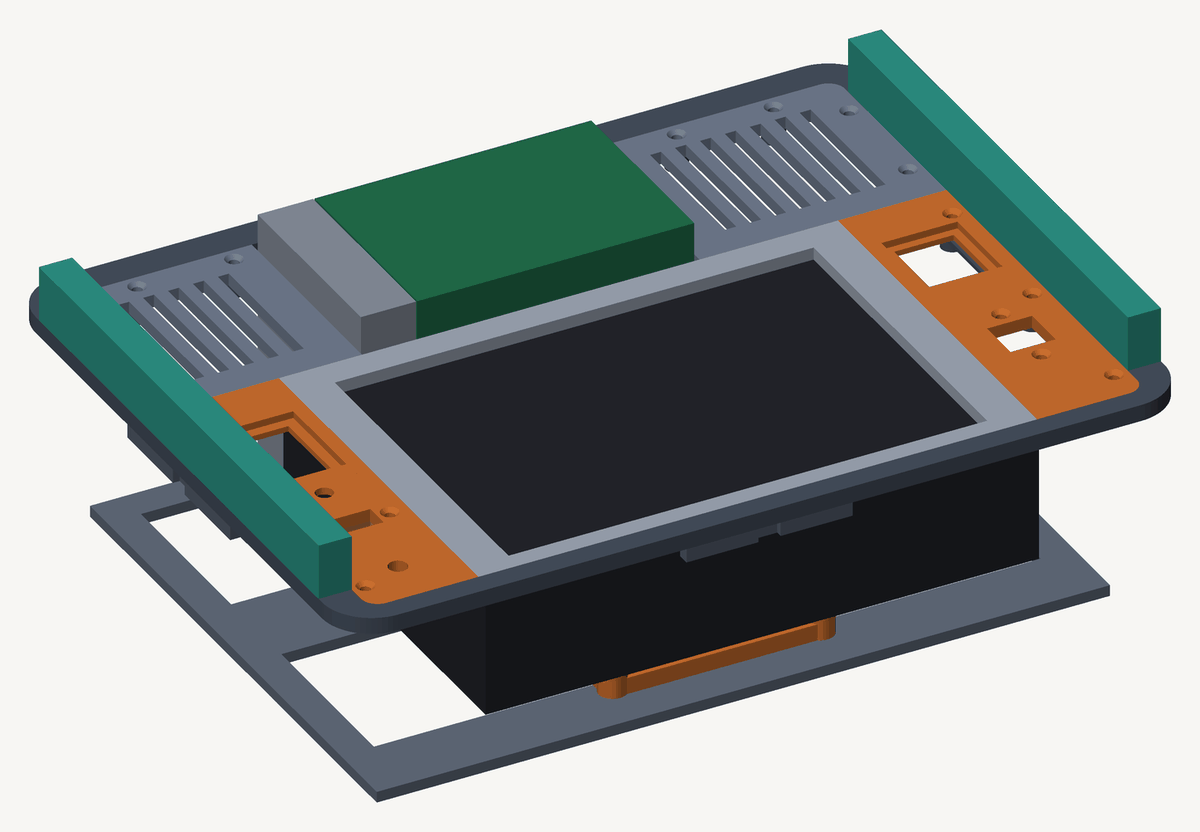
The deck is finished and in service. It holds full 2.4 GHz with the lid shut, runs about six hours on the internal pack, carries 123 GB of offline reference on an NVMe, and brings up a complete ham stack from one switch. No network and no mains required.
This is in three parts: the enclosure, the software, and then an account of why sixty-five assertions written into the CAD never caught a single fault.
The case
The one constraint
The deck needed to be waterproof closed, and it was never going to run closed. That one condition settles more of the design than it appears to.
It produces three consequences. (1) The shell doesn’t get drilled. Every hole in a Pelican is a seam that eventually fails, and the gasket is the only reason to choose one over a toolbox, so all the I/O sits on an internal faceplate that’s exposed only when the lid is open. (2) The connectors no longer need to be waterproof, since they’re sealed inside a rated box whenever the deck is stowed, which means ordinary panel-mount parts rather than IP67 ones. (3) Cooling stops being a design problem, because airflow only matters in a sealed running box and this one never runs sealed.
One condition, three problems removed.
The rib shelf
The Pelican 1400 has twelve moulded ribs inside, three per wall, with their tops finishing at exactly 75 mm off the floor. The whole design is organised around that number.
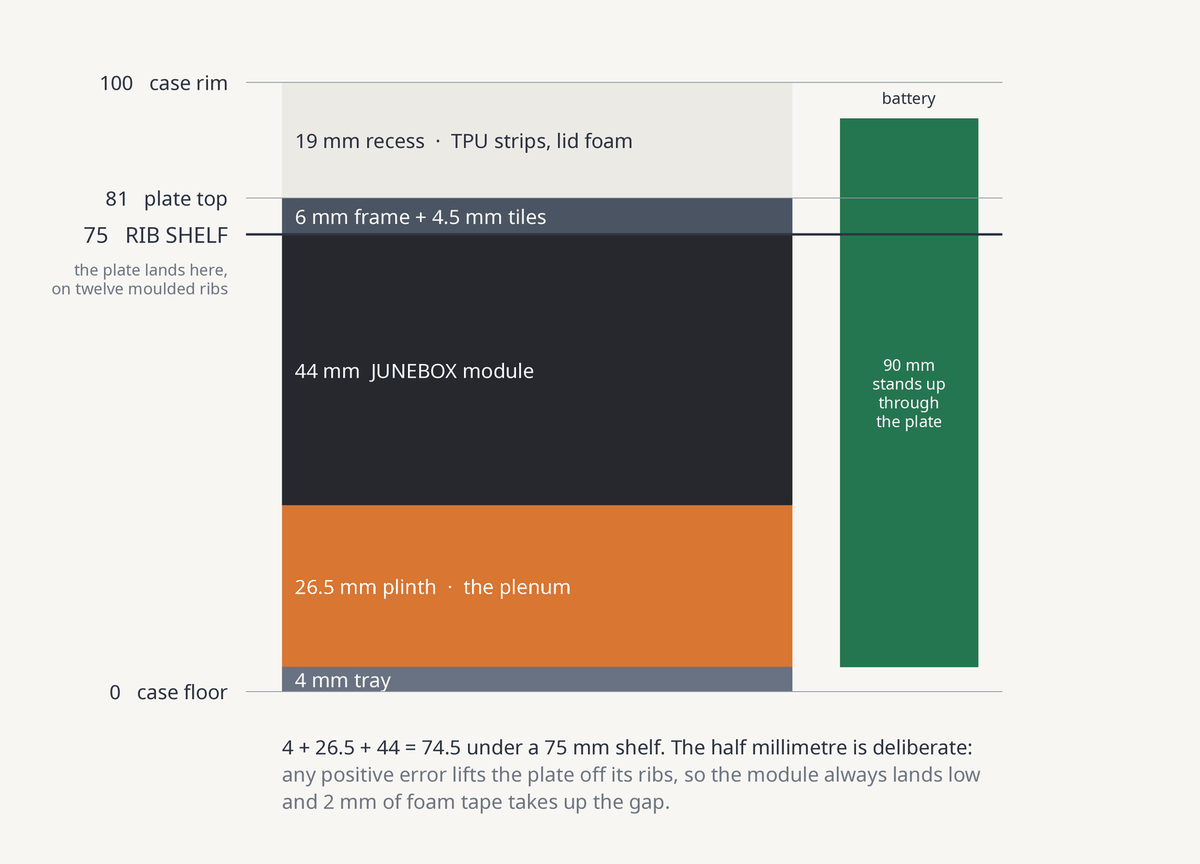
The plate rests on those ribs. Nothing is drilled, bonded or glued to the shell. It drops in, lands on twelve points, and the case walls prevent it sliding.
Plate width is the dimension that needed thought. The rib inner faces sit at 2 and 303, so the shelf opening is 301 mm and a plate of width P has 305 − P of lateral freedom. Pushed fully against one wall, the thin side retains exactly P − 303 mm of bearing. At 304 that is 1 mm, at 304.5 it is 1.5, and at 303 the plate can leave the shelf entirely.
I drew it at 304.5, on the principle that the two failure modes are not symmetric. A plate that comes out too wide sands down in ten minutes. One that comes out too narrow cannot be corrected at all, because material can’t be added back. Where a dimension can’t be measured precisely, the error belongs on the recoverable side.
Load was never the concern; 1 mm of bearing across twelve ribs carries a 2 kg assembly without difficulty. The concern was the plate migrating off its shelf in transport, which it cannot do. Escape requires 2 mm of lateral travel and the wall arrests it at 1.
Frame and tiles
The Ender 3 bed is 220 × 220, roughly 215 usable. The plate is 304.5 × 230.5. It does not fit diagonally either, and a 304 mm part at 4.5 mm thick would warp off the bed regardless.
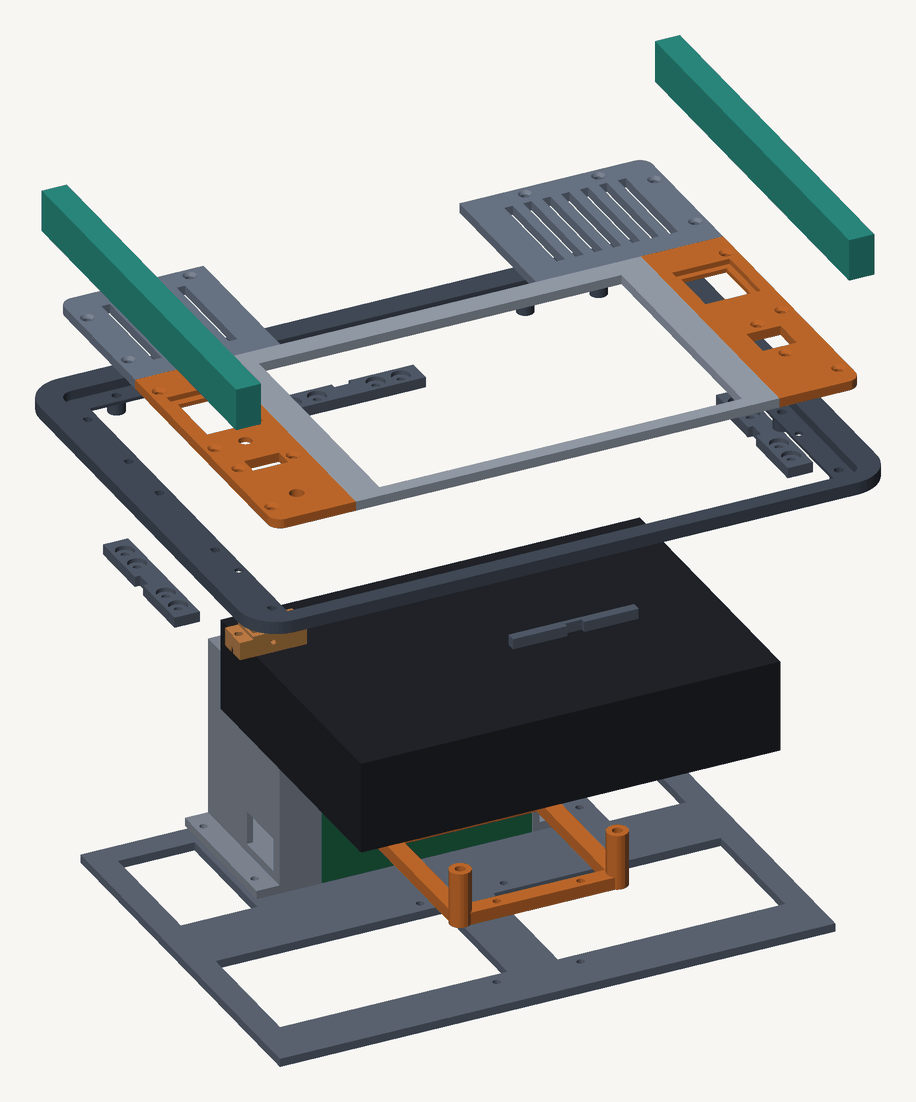
The plate is therefore a frame of four L-shaped members, lap-jointed with M3s through separate splices, with five tiles seated on a ledge inside it. Fifteen distinct parts, 23 pieces on the bed.
Two benefits came out of the split that I hadn’t planned for. The joints have to land over a rib rather than mid-span, which fixes their positions without further thought. And every connector ends up on a tile small enough to reprint alone when a cutout comes out wrong, which happened repeatedly.
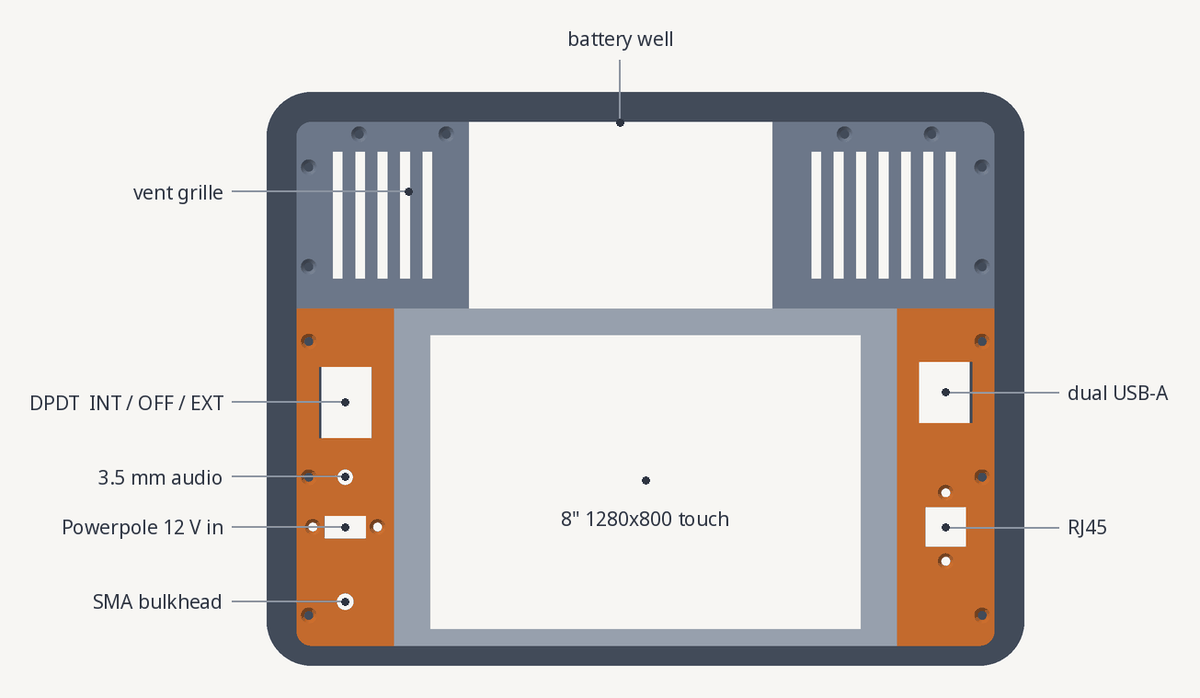
Power and RF are on the left rail, data on the right. That follows the module rather than preference: its own ports exit the left edge (power, audio) and the right edge (USB, Ethernet), so mirroring the module keeps every internal run short.
Thermal
Both of the module’s vents face down into a largely enclosed plenum beneath the plate, and no airflow path was designed. I expected to pay for that.
baseline  51.6 C
t=30      67.0 C   2400 MHz   0x0
t=210     74.1 C   2400 MHz   0x0
t=300     73.6 C   2400 MHz   0x0
Full clock throughout, no throttle bits, settling near 74 C. The same synthetic test measured 76.8 C on the bare hardware before the deck existed, so the enclosure runs 2-3 C cooler than the machine did open on a desk. The plenum is probably acting as a duct, but I haven’t instrumented that and won’t claim it.
One caveat belongs with any figure that flatters the design: this is a scalar spin loop, and the script that produces it warns that it understates real load. The same script records a compile at roughly 85 C and LLM inference at 82.3 C. Measuring a compile inside the case is the test still outstanding.
The software
Keeping it additive
The deck runs Raspberry Pi OS trixie, with niri added alongside rather than replacing anything. labwc stays installed and remains a valid session. Everything built from source installs under /usr/local, which no distro package owns. The apt steps only add. Configs are symlinked into ~/.config/{niri,waybar,foot}, all new directories, and ~/.config/labwc is never touched.
Recovery is logging out and selecting labwc. For a machine whose purpose is working when other things don’t, the failure mode should be dull.
Fedora was the obvious starting point, since I already maintain bootc images, and I ruled it out on four specifics rather than preference. NVMe root isn’t supported on the Pi 5 and this machine boots from a 512 GB NVMe. Audio doesn’t work, and on a ham deck audio is the payload. Thermal management doesn’t work. And no Atomic image exists for the Pi 5 at all, so the base those reference repos would have needed isn’t there. Any one of the four would have been sufficient.
Two traps are worth recording. trixie packages the entire niri ecosystem (foot, fuzzel, waybar, swaybg, mako, seatd, xwayland) but not niri itself, which missed the freeze. And trixie ships rustc 1.85 while niri v26.04 declares 1.87, so the distro toolchain fails with a confusing error rather than a clear statement that the compiler is too old. That is the only reason the build script installs rustup.
The screen
The panel is 1280 × 800, and that single fact propagates into most of the configuration.
Scale 1 is forced rather than chosen, and the question is settled by arithmetic. Decoding this machine’s own WSJT-X.ini (Qt stores window geometry as base64 saveGeometry blobs) gives a saved main window of 880 × 685. At scale 1.25 the logical desktop is 1024 × 640, so the WSJT-X main window alone would not fit on an empty screen. Legibility is recovered through font sizes in foot and waybar instead.
The rest follows. Gaps of 4 rather than 8. Column presets of 0.5/0.75/1.0 rather than thirds, since a 0.33 column here is 427 px and serves nothing. waybar at height 24 with a binding to hide it, because those 30 px decide whether WSJT-X fits.
Focus-follows-mouse is disabled, which reverses both of my other configs. On a touchscreen the pointer jumps to wherever the panel was last touched and then remains there, so focus-follows-mouse would assign keyboard focus based on a stale position. Keyboard focus only, and cursor { hide-when-typing } for the same reason: here the pointer is an artefact of touch rather than a pointing device.
Which FT8 program
I ran all three and measured the windows with niri msg windows rather than reasoning about them.
| Windows | Settings dialog | |
|---|---|---|
| WSJT-X 2.7.0 | 2 | 1280 × 813 |
| JTDX 2.2.159 | 2 | n/a |
| MSHV 2.76.7 | 1 | n/a |
MSHV places the waterfall inside the main window. The other two require a second floating window positioned by hand-written rules, on a panel with roughly 776 px of usable height. WSJT-X’s settings dialog measures 813 px on an 800 px screen, which the .ini decode had predicted at 811, so the prediction held and the problem is real.
The reasonable prior is that a niche fork gives up integration, so I checked the built binary rather than assuming. MSHV retains UDP port 2237, the WSJT-X protocol port, so QLog and GridTracker work against it. PSK Reporter is built in. ADIF export is present along with direct ClubLog, eQSL and QRZ upload. The choice costs no ecosystem and buys one window instead of two on a screen that cannot afford two.
WSJT-X stays installed as the reference implementation. JTDX is a WSJT-X fork and duplicates that fallback rather than adding one.
Reading Wikipedia with no mouse
The deck has a touchscreen and a keyboard and no mouse, and kiwix-desktop is only partly keyboard-driven. Its chrome is fine (Ctrl+T, Ctrl+L and Ctrl+B all work), but the content area is a QtWebEngine view, so following a link within an article means tabbing through every preceding link. On a Wikipedia page that is hundreds of keystrokes to reach one target, and following links is the most common action in an encyclopaedia.
The solution is to stop treating it as an application. kiwix-serve publishes the existing kiwix-desktop library on :8080, so one catalogue feeds both front ends, and the reading happens in qutebrowser. Pressing f labels every visible link with a letter. The most frequent action on the machine drops from O(links) keystrokes to two or three.
It also unified the deck, since one keyboard-driven browser now reaches both the ZIM library on :8080 and a local 7B model on :8081. The library stands at 49 books, with medical coverage from three directions: encyclopaedic, emergency clinician, and austere field conditions, because the first two assume a hospital.
What the checks missed
Sixty-five assertions in the CAD, and none of them ever caught a fault. Every fault in this build, mechanical and software alike, was found by looking at something: a photograph, a slicer screenshot, a caliper, a log.
The reason is structural. A check encodes the author’s model of the problem, so when the model is wrong in a way the author didn’t consider, the check agrees with it. The larger the set of checks, the more confidence they produce in a plate that doesn’t fit.
The clearest instance is mechanical. I drew the module plinth at 31 mm, being 75 for the shelf less 44 for the module. The assertion guarding it amounted to assert(31 == 75 - 44), which passes. What it should have tested is the full stack against the shelf, and the stack includes the 4 mm tray the plinth stands on. The correct figure is 26.5. The print had already started.
The same pattern recurred four more times, and it is one error in each case: the part was checked against its own definition rather than against what it has to meet. An assertion that can be satisfied by rearranging its own definition is a restatement, not a test.
I verified this rather than assuming it. Forcing the tray thickness to 6 mm should have pushed the stack past the shelf and thrown. Instead the plinth silently became 24.5 and the assertion reported 75. Four assertions in that file now carry a TAUTOLOGY label in the source, since deleting them would only mean writing them again later.
The software side has the same defect, which is what persuaded me this isn’t specific to CAD.
The SD card was a clone of the NVMe with byte-identical PARTUUIDs on both partitions. /etc/fstab mounts /boot/firmware by PARTUUID and the kernel cmdline selects root the same way, so both selectors matched two devices and whichever enumerated first won. I observed it change across three reboots. The consequence: a script run to cap the CPU clock wrote to /boot/firmware, which on that boot was the SD card. The firmware boots from NVMe, read the other config.txt, and the cap did nothing. I then measured the results of a change that had never been applied. The measurement was not incorrect, it was meaningless, and nothing about it looked unusual.
The boot-integrity checker had the same fault in the opposite direction. It searched the kernel image with strings for a version number and reported divergence on a healthy system, because kernel_2712.img is gzip compressed and the string is never present in plaintext. A check that raises false alarms is worse than no check, since it teaches you to disregard it.
A smaller one cost an afternoon. pgrep -f jtdxjt9 over ssh matches the command line of the ssh-spawned shell itself, so it counts itself. That inflated every figure in the first pass and briefly indicated six duplicate processes that did not exist. pkill -f over the same connection is worse than misleading, since it terminated the session mid-command.
Reporting tools
What worked was tooling that reports rather than asserts. One script slices a finished STL and lists every loop’s size and centre; another draws it. Neither knows what the answer should be, which is why they found things, including two tiles that had exported with no screw holes at all. That fault had been visible in the facet count the whole time: 112, against 2176 for a comparable part.
The same held on the software side. What finally resolved the duplicate-UUID problem was lsblk -o NAME,PARTUUID,LABEL printing what was actually present, rather than a script asserting what should have been.
The renders in this post work the same way. They are generated from the assembly model rather than drawn separately, so the drawings cannot disagree with the geometry that was verified.
The practical conclusion is to build the reporting tool early. It is less satisfying than a set of assertions and it repays the effort within the first week.
Should you build one
For a go-box that has to survive a truck bed and operate without mains or network, a 1400 with a self-contained 12 V display module is a sound arrangement, and the rib shelf allows the entire build without a single hole in the case.
It is not a laptop substitute. The deck lies flat, it is viewed from above, and the keyboard is a separate object placed in front of it. That suits touch and reading, and it is worse than a laptop for a long typing session.
The models, provisioning scripts and a summary of the faults worth generalising from are at github.com/mark-iid/cyberdeck. The OpenSCAD is MIT licensed. Adapting the faceplate to a different case means changing CASE_W, CASE_D, SHELF_H and CORNER_R in deck.scad; the rest derives from those four.